Discord server management bot
The Discord ticket bot that runs the rest of your server too
Better Tickets is a free Discord bot for support tickets, staff applications, jail and auto-jail, XP leveling and roleplay commands. You set all of it up from one web dashboard, so your server needs fewer bots and fewer sets of permissions to keep track of.

- Discord servers
- ticket question types
- 8
- roleplay actions
- 50+
- dashboard for every module
- 1
Why one bot
Tickets, applications, jail and XP without the bot clutter
Most servers end up with a ticket bot, an application bot, a moderation bot and a leveling bot, each with its own dashboard, command list and role permissions. Better Tickets covers those jobs in one bot, so there is one place to configure, one set of permissions to audit, and one activity log.
One bot, one dashboard
Tickets, staff applications, staff management, jail, leveling, roleplay and a message builder share one web dashboard and one set of bot permissions.
Permissions down to the button
Claim, unclaim, close, delete, reopen, transcript and voice-request buttons can each be limited to their own roles.
Transcripts you can verify
Every HTML transcript is cryptographically signed when it's created. Run /verify on the file later to prove nobody edited it.
Eight modal question types
Ask up to five questions when a ticket opens: short or paragraph text, numbers, select menus, users, roles, channels or file uploads.
Jail and auto-jail
Move a member into a private jail ticket with one command, or jail them automatically when a message matches a word list or regex.
A message builder with live preview
Compose embeds, Components v2 layouts, buttons and select menus, then send them as the bot or through a webhook.
Support tickets, start to close
A ticket system your staff can actually keep up with
A member picks a category from your panel and answers your questions in a form. Better Tickets opens a private channel and pings the right staff roles. /claim marks who owns the ticket so two moderators never answer the same person, /close saves a signed transcript, and /verify proves later that it was not altered.
How to set up a ticket system on DiscordStaff Hub
See how your staff are actually doing
Staff Hub turns the tickets and applications your team already handles into a staff overview: claims, closes, median time to claim and reviews for each member. It flags staff who have gone quiet and tickets nobody has claimed, posts a weekly report, and runs ranks with trial goals, strikes, notes and leave requests, so you can manage your team without a separate staff bot. Included with Plus and Max.
How to track Discord staff activityNo JSON required
Build Discord messages with a live preview
Write rules, announcements and ticket panels in a visual editor and watch the Discord message render as you type. Load a message the bot already sent to edit it in place, or import and export the layout as JSON.
See what the message builder can send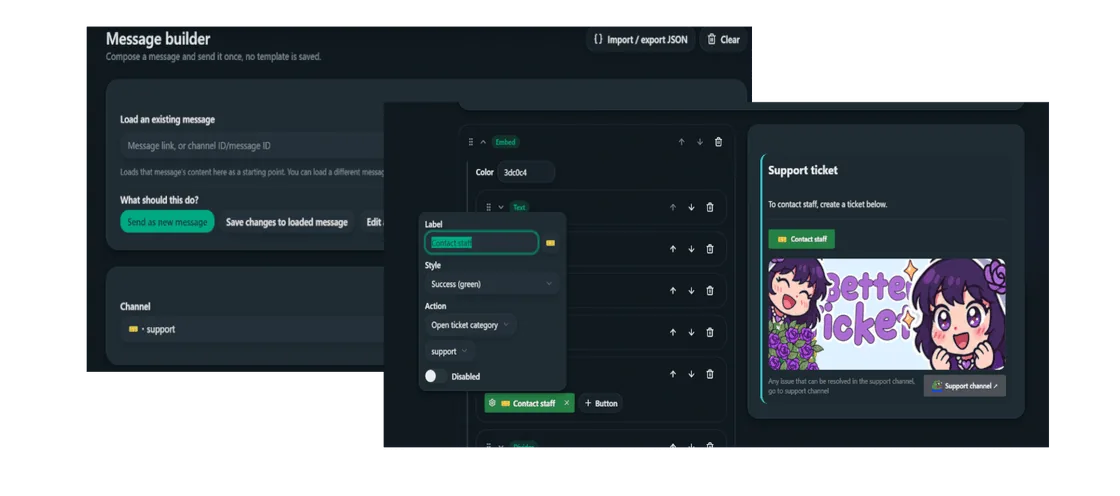
Chat and voice XP
Leveling with a curve you control
Members earn XP for chatting and for time in voice channels. You set the XP range, cooldown and level curve, hand out roles as rewards, boost XP in chosen channels or roles, and members get a rank card with /level rank.
Discord leveling systems explained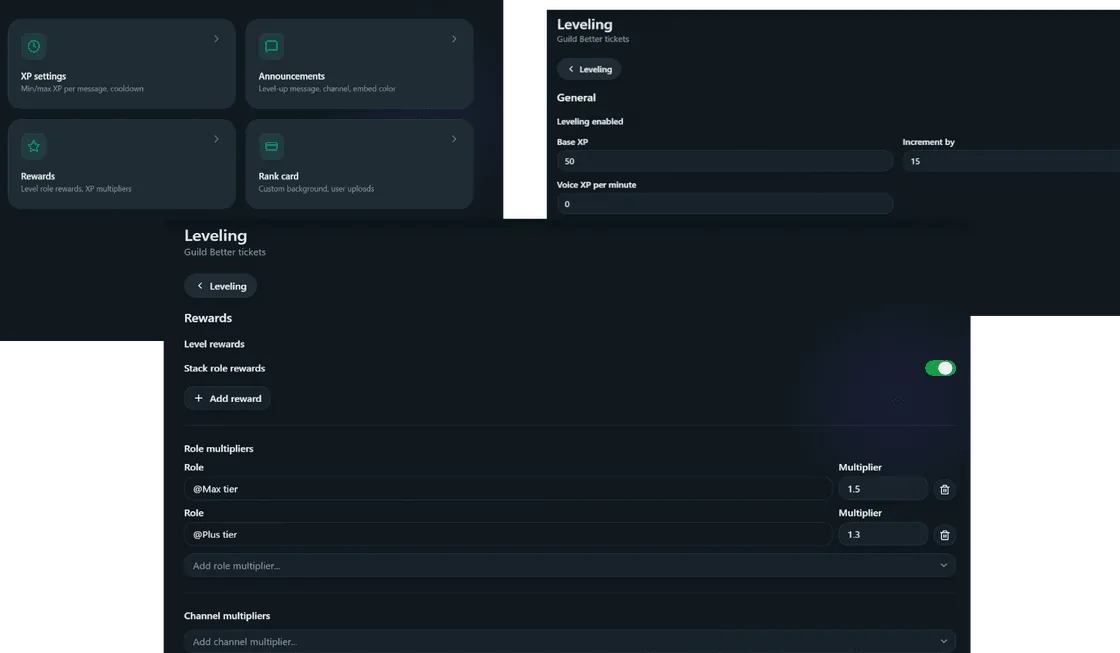
Modules
Everything Better Tickets does
Each module is configured from the same web dashboard. Follow a card to its documentation.
Ticket system
Staff applications
Jail and auto-jail
Leveling
Roleplay commands
Message builder
Emoji and sticker stealer
Command permissions
Web dashboard
Free, no login
Free Discord tools
Browser tools for the fiddly parts of Discord formatting. They work with any bot or webhook.
- Discord embed generatorBuild an embed, preview it, and copy webhook-ready JSON.
- Discord color pickerHEX and decimal codes with a live role and name preview.
- Discord timestamp generatorDates that show in every reader’s own time zone.
- Discord colored text (ANSI)Color and style text inside an ansi code block.
Learn
Guides and comparisons
How to run the systems every growing server needs, and honest comparisons with other Discord bots.
Set up your first ticket panel in five minutes
Invite the bot, create a ticket category in the dashboard, and send the panel to a channel. The quickstart walks through each step.