Discord moderation comes down to matching the response to the problem: a warning for a first slip, a timeout to cool things down, a jail when you need a private conversation, and a kick or ban when someone shouldn't be in the server. A jail system is the middle option: it hides the server from a member and opens a private channel where staff can talk it through. This guide covers each tool, when to use it, how to build a jail that stays fair and auditable, and how Better Tickets handles jail and auto-jail.
The moderation ladder
Most well-run servers escalate step by step:
| Step | What it does | Good for |
|---|---|---|
| Warning | A message from staff, publicly or in DMs | First, minor rule breaks |
| Delete message | Removes the content | Anything that shouldn't stay visible |
| Timeout | Discord's built-in mute, up to 28 days; the member can't message, react or join voice | Heated arguments, spam bursts |
| Jail | Removes roles, hides the server and opens a private channel with staff | Repeated issues, disputes, anything that needs a conversation |
| Kick | Removes the member; they can rejoin with an invite | Clear-cut breaks where a fresh start is fine |
| Ban | Removes the member and blocks them from rejoining | Serious or repeated harm, raids, scams |
Skipping steps isn't wrong: a scam link or a raid deserves an instant ban. The ladder is for the grey areas, where most moderation happens.
When to use a jail instead of a timeout
A timeout is quick and built into Discord, but the member is left waiting in silence. A jail is better when:
- The member needs an explanation. New members often don't know which rule they broke.
- There are two sides to the story. Staff can hear from the member privately before deciding.
- You want a record. A jail channel is a written conversation you can keep as a transcript, while Discord's audit log only keeps entries for 45 days.
- The problem keeps coming back. A jail with a conversation changes behavior more often than repeated silent timeouts.
Build a jail that's fair and auditable
Whatever tool you use, a good jail has these properties:
- It really isolates. The jail role must be denied View Channel in every other channel, otherwise the member can still read and post. Discord permissions explained shows why a single overwrite is easy to miss.
- It survives leaving. Members shouldn't escape by leaving and rejoining.
- Roles come back exactly. When released, the member should get back the roles they had, not a guess.
- It's limited to the right staff. Only moderators should be able to jail, and nobody should be able to jail someone above them.
- It leaves a record. Keep a transcript of the conversation and the reason for the jail.
Automate the obvious cases
Some rule breaks can be caught automatically:
- Discord AutoMod is built into every server. It can block messages that contain keywords, mention spam or common spam patterns, alert staff and time members out. Its custom keyword rules also accept up to 10 regular expressions, which use Rust-flavored regex syntax.
- Auto-jail triggers in Better Tickets jail a member when their message matches a word list or a regular expression, so staff can follow up in the jail channel.
Automated rules make mistakes, so keep patterns narrow, exempt your staff roles, and review what they catch. Test any regex against real examples first with the regex tester.
Set up a jail with Better Tickets
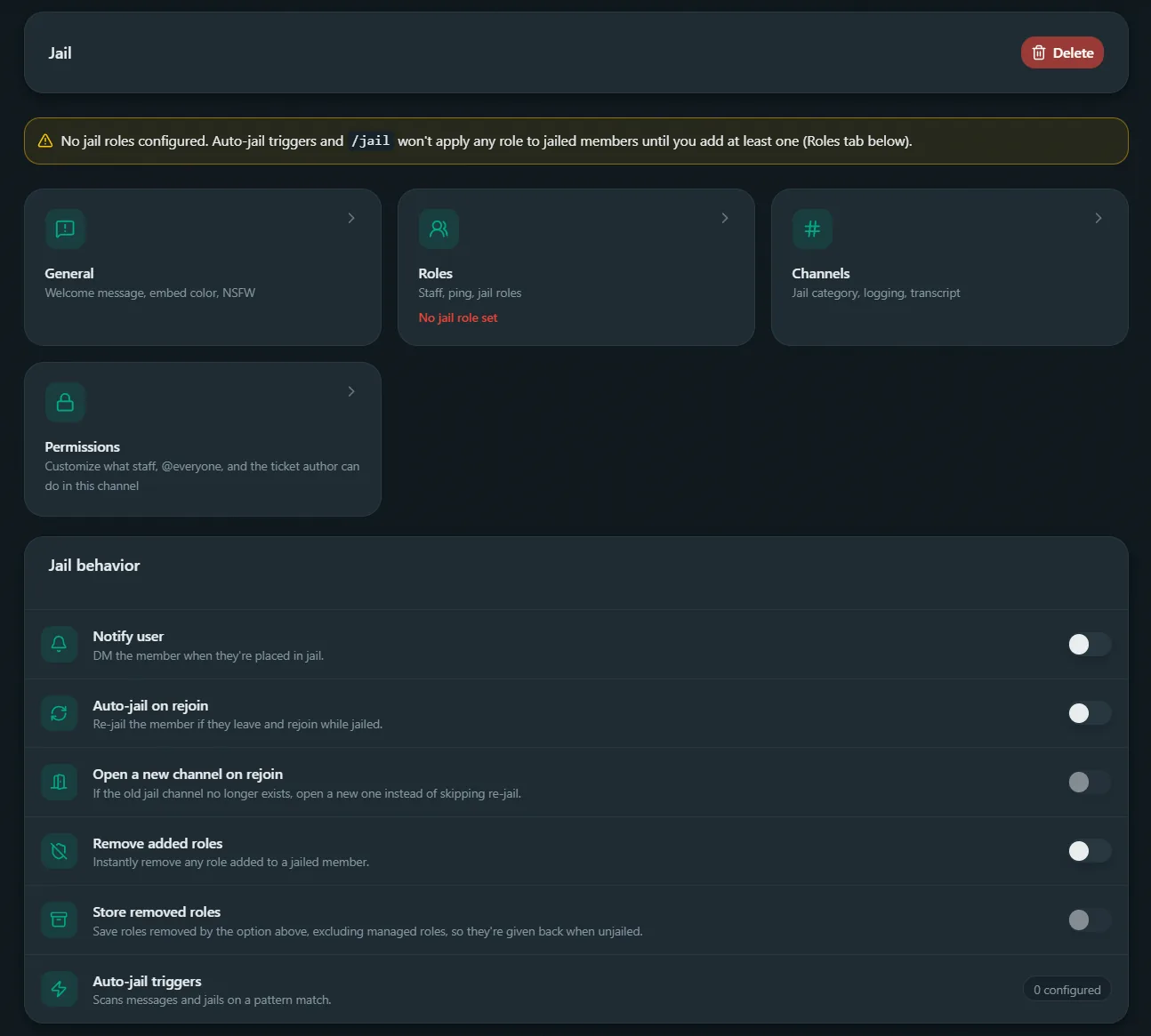
In Better Tickets, jail is built on the ticket system: one ticket category becomes the jail category, so each case gets a private channel, staff permissions and a transcript.
Create and link the jail category
In the dashboard, open the Jail page, create a jail category and link it. Only one category can be the jail at a time.
Set the jail role
On that category's Roles tab, add the role that jailed members receive. /jail won't run until one is set.
Isolate the jail role everywhere
Click Sync role permissions to deny View Channel and Send Messages for the jail role on every channel that doesn't already have a setting for it.
Handle rejoins and roles
Turn on Auto-jail on rejoin so leaving doesn't reset the jail, and Store removed roles so /unjail gives back exactly what was taken.
Add auto-jail triggers (optional)
Add triggers with a list of words or regex patterns, a reason, whether to delete the matching message, and roles or channels to ignore.
Jailing and releasing a member
/jail member:@riley reason:Repeated spam in #general removes Riley's roles, gives them the jail role, opens a private jail channel and records what was removed. The command refuses to run if Riley's highest role is equal to or above yours or the bot's, if the bot lacks Manage Roles, or if the target is the server owner or a bot.
/unjail member:@riley restores exactly the roles that were removed. To move an existing ticket into jail instead, run /escalate inside it and pick the jail category. Closing the jail channel saves a signed transcript like any other ticket.
What Better Tickets doesn't do
Better Tickets focuses on jail, auto-jail and command permissions. It doesn't issue warnings, kicks or bans, or keep a warning history. Use Discord's built-in tools or a dedicated moderation bot alongside it for those.
Frequently asked questions
What is a jail on Discord?
A jail is a private channel a member is moved into when they break the rules. Their normal roles are removed so they can't see the rest of the server, and staff talk the problem through with them in that channel. It's a middle step between a warning and a ban.
What's the difference between a timeout and a jail?
A Discord timeout stops a member sending messages, reacting or joining voice for up to 28 days, but it gives staff no private place to talk to them. A jail hides the server and opens a private channel, so staff can explain the problem and hear the member's side.
How long does Discord keep moderation history?
Discord's audit log keeps entries for 45 days. For anything you need longer, keep your own records, for example saved transcripts of jail conversations or a private log channel.
Can a bot jail people automatically?
Yes. Discord's built-in AutoMod can block messages or time members out when they match keywords. Better Tickets auto-jail triggers go a step further and jail the member, opening a private channel, when a message matches a word list or regular expression.
What happens if a jailed member leaves and rejoins?
Without protection, rejoining gives them a clean slate. In Better Tickets, turn on Auto-jail on rejoin so the jail role is reapplied, and optionally open a new jail channel if the old one is gone.
Do I still need a moderation bot for bans and kicks?
Discord's own kick, ban and timeout tools work well without a bot. Better Tickets covers jail, auto-jail and command permissions, not bans, kicks or warning logs, so use Discord's tools or a dedicated moderation bot for those.