Better Tickets leveling gives members XP for chatting and, if you turn it on, for time spent in voice channels. XP turns into levels using a curve you set, members see their progress on a rank card with /level rank, and you can hand out roles automatically at chosen levels.
If you've used MEE6 or another leveling bot, the pieces are the same: XP, a level curve, rank cards and role rewards. Discord leveling systems explained covers how to tune them, and the MEE6 alternative comparison puts the two side by side.
Turn on leveling
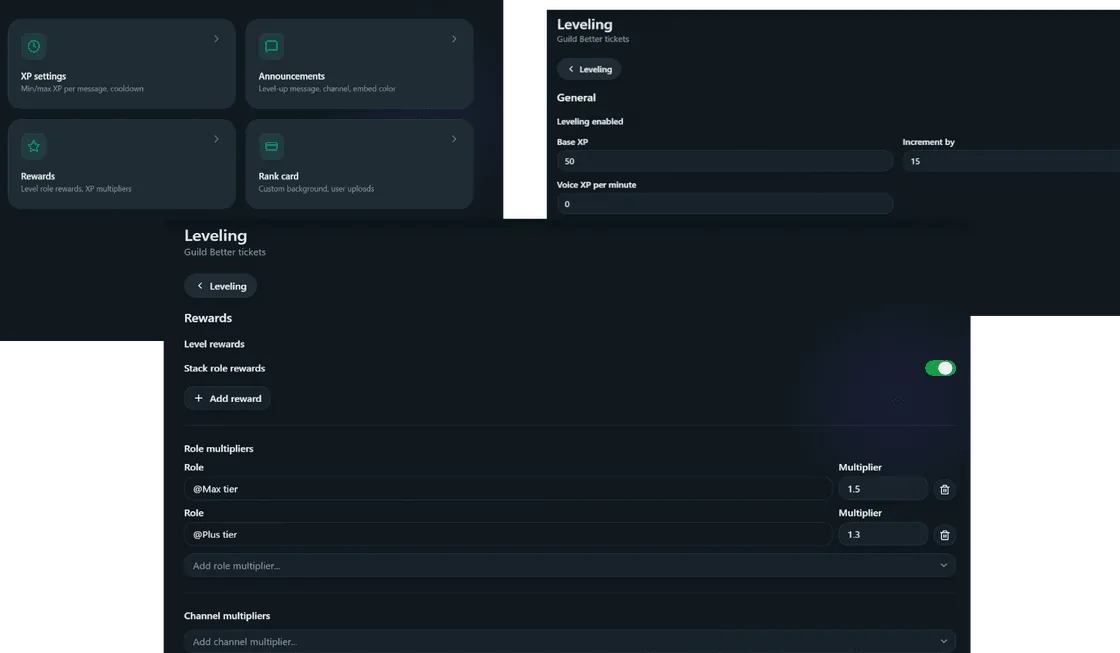
Open Leveling → Settings & rewards to enable leveling and configure XP, rewards, restrictions and announcements. The editor opens on General; Rewards, Announcements, XP settings, Restrictions and Rank card are the other tabs. Enabling leveling preserves existing member XP. /level config also links to this editor.
How members earn XP
- Cooldown (60 seconds by default): only one message per window earns XP, so spamming doesn't help.
- Restrictions: ignored roles, required roles, ignored channels. Ignored always wins over required.
- Multipliers: XP boosts for chosen roles or channels. If several apply, only the highest one counts; they don't stack.
Voice XP
Voice XP is off by default; set Voice XP per minute to turn it on. Members earn XP for each full minute they spend in a voice channel that isn't ignored, and you can choose whether to only count unmuted time. The same restrictions apply as for messages, and multipliers can apply too. Time keeps counting when a member switches channels; leaving, muting (if unmuted time is required) or moving to an ignored channel ends the session. A session left open for more than 2 days loses its uncounted time.
The level curve
Level 1 costs Base XP (50 by default), and each level after that costs Increment by (15 by default) more than the one before. It's a steady ramp rather than an exponential one. Levels are always calculated from total XP and never stored, so changing these values re-levels everyone instantly.
Rank cards
/level rank shows a member's level, server rank and progress to the next level as an image card, or as a text embed with embed:Yes.
With Premium, the card's background has two layers:
- Server default, uploaded by an admin.
- Per-member background, set with
/level cardif Allow users to set their own cards is on. It only changes that member's card.
Without premium, cards use the built-in look. Uploads are capped at 2 MB and compressed automatically.
Role rewards
On the Rewards tab, give roles when members reach a level. With Stack role rewards on, members keep every reward they've earned; with it off, they keep only the highest one.
Level-up messages
On the Announcements tab, post a message when someone levels up, either in a fixed channel or wherever they were chatting. It supports message variables plus {{level}}.
Leaderboard
/level leaderboard shows a paginated leaderboard in Discord. The dashboard's Leaderboard page is the full admin view: search by username, set the page size and jump to any page.
Each row has:
- Edit: set a member's XP, message count and voice minutes directly. Min 0, sanity-capped max.
- Delete: wipes a member's XP profile. Can't be undone.
Two calculators on the same page: level → total XP required, and XP → level, both using your server's real Base XP/Increment by values.
See leveling commands and leveling settings for field-by-field details.