A Discord jail isolates a member from the rest of the server without kicking or banning them, so staff can talk it through in private. In Better Tickets, jail is built on the ticket system: one ticket category becomes the jail category, and jailing a member removes their roles, gives them a jail role and opens a private channel for them there.
For when to jail rather than time out or ban, and how to keep it fair, read the Discord moderation and jail system guide.
Set up the jail
Create a category
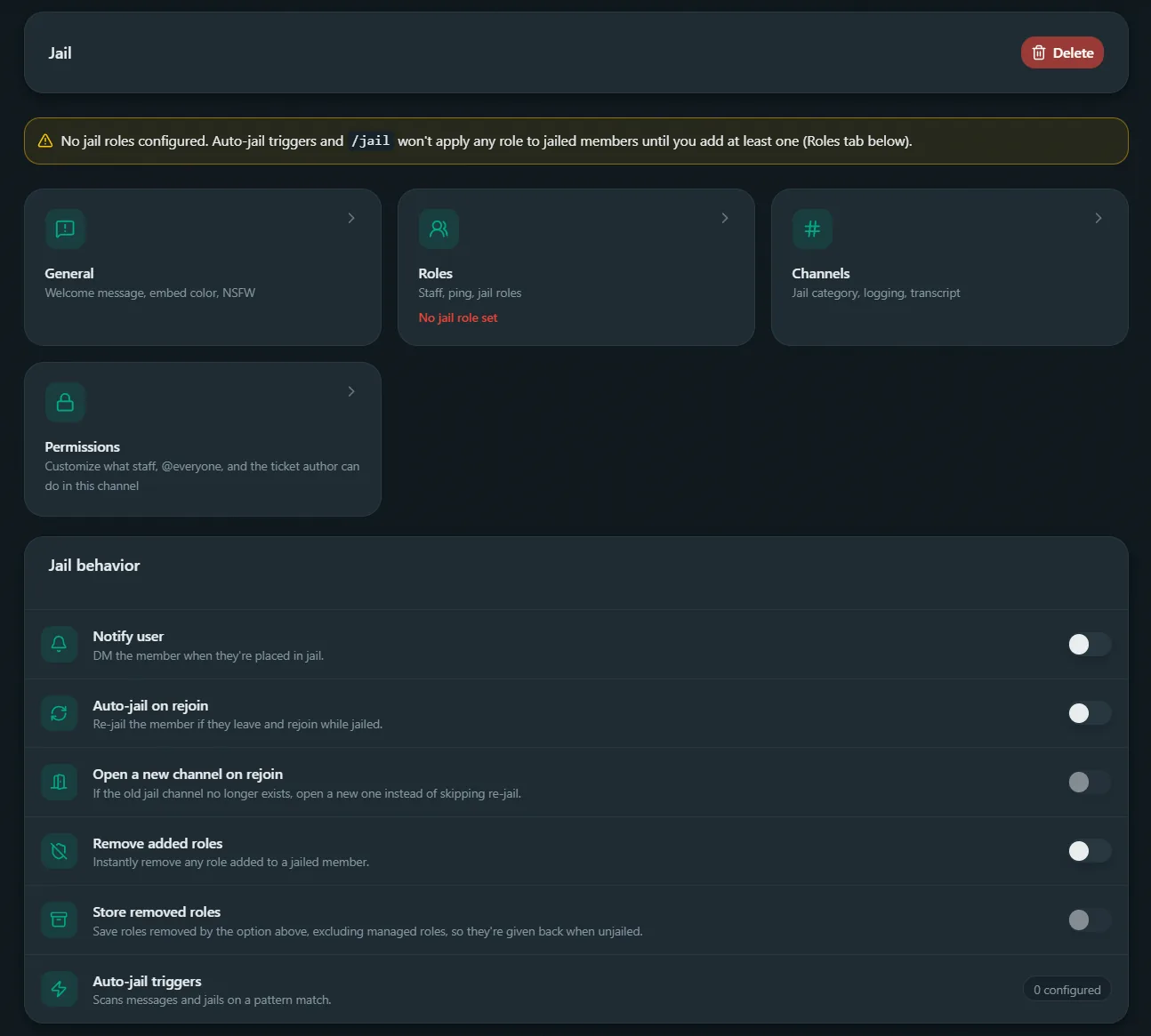
In the dashboard, open the Jail page and create a jail category.
Link it to jail
Pick the category on the dashboard's Jail page. Only one category can be linked at a time; picking another moves the link. Choosing "No jail category" turns jail off.
Set the jail role
That category's Roles tab → Assign role (Jail roles). Without one,
/jail refuses to run.
Optional: sync it everywhere
Same tab, click Sync role permissions to deny View Channel and Send Messages for the jail role across every other channel too.
Optional: notify on jail
Toggle Notify user to DM jailed members the reason. Silently skipped if DMs are closed.
Optional: handle rejoins
Auto-jail on rejoin re-applies the role swap if a jailed member leaves and comes back. Open a new channel on rejoin also opens a fresh channel if the original is gone.
Optional: handle roles
Remove added roles removes any non-jail roles the member picks up while jailed. With Store removed roles on, those roles are saved and given back together with their original roles when they're unjailed.
Once a category is linked to jail, members can't open tickets in it
themselves. Only /jail and /escalate can put someone there.
Jail a member
/jail member:@riley reason:Repeated NSFW spam in #general:
- Removes their current roles.
- Applies the jail category's assign role(s).
- Opens a channel for them there, like
#jail-riley. - Records what was removed, for later restoration.
Blocked outright if: the target's highest role is ≥ yours (owner exempt), above the bot's own highest role, the bot lacks Manage Roles, or the target is the owner or another bot.
/unjail member:@riley gives back the roles that were removed and takes the jail role off. Roles they were given while jailed are kept. The channel stays open, close or delete it separately. Closing the jail channel releases them the same way; if the bot can't give their roles back, the channel stays open so nothing is lost.
Rejoin handling
With Auto-jail on rejoin on:
- Channel still exists → access is restored.
- Channel gone, Open a new channel on rejoin on → a fresh one is created.
- Channel gone, that setting off → roles swap back, no new channel.
Escalating into or out of jail
/escalate category:jail, run inside an open ticket, moves it into jail with the same role swap /jail does. Running /escalate on a jailed ticket to a normal category reverses it, same as /unjail.
Auto-jail triggers
Auto-jail triggers jail a member automatically when one of their messages matches. You set them on the dashboard's Jail page. Each trigger has:
- Patterns: one or more plain text strings, or regular expressions (with optional flags such as
ifor case-insensitive). - Reason: recorded as the jail reason.
- Delete trigger: whether to delete the message that matched.
- Ignored roles and channels: members with these roles, or messages in these channels, never trigger it.
Test a regex before you save it with the free regex tester, which also explains the syntax.