/emoji steal copies custom emojis and stickers from another server into yours. Paste the emoji, or reply to a message that contains it, and choose whether to add each one as an emoji or a sticker. There's nothing to set up; you only need the right Discord permission.
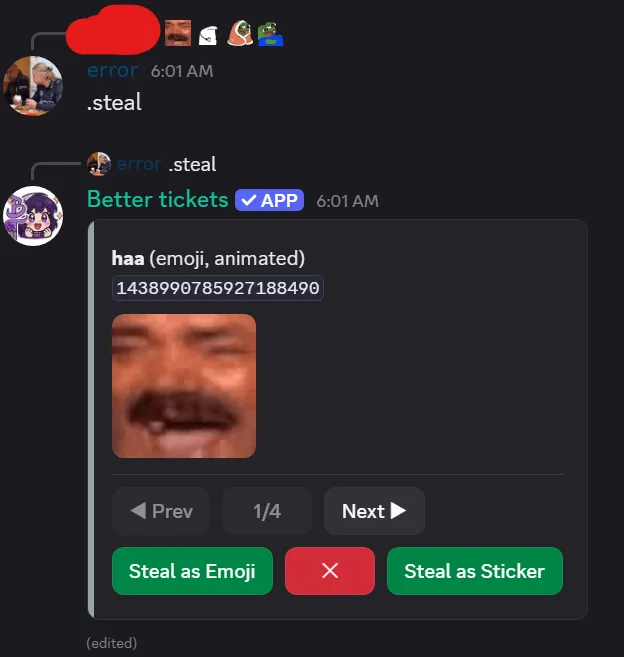
Find emojis and stickers to steal
emojioption: paste one or more custom emojis, for example/emoji steal emoji:<:vibing:1091234567890123456>.- Reply to a message: every custom emoji and sticker in it is picked up automatically.
Standard Unicode emojis like 😎 can't be stolen, only custom ones. Each run handles up to 10 items.
Browse and steal
By default, the command opens a browser that shows one item at a time, with Prev/Next buttons, ✕ to close, and:
- Steal as Emoji: adds to this server's emoji list.
- Steal as Sticker: adds to this server's sticker list.
The two are independent, so you can add the same item as both. A Lottie (animated vector) sticker can't become an emoji. The browser lasts 10 minutes and only you can use its buttons.
Steal everything at once
--all skips the browser and steals every found item as its native kind:
/emoji steal emoji:😎🔥 all:True
The reply lists what succeeded and why anything failed.
Permissions
Running it needs Administrator, Create Server Expressions or Manage Server. The bot needs Manage Server Expressions, if missing you get a clear error instead of a silent failure.
Server slot limits
Every server has a limited number of emoji and sticker slots, set by its boost level: 50, 100, 150 or 250 emojis and 5, 15, 30 or 60 stickers. The bot checks for free slots first and tells you if the server is full.
See the emoji steal command reference for every option.