The Better Tickets message builder lets you design a Discord message visually and send it to any channel: text, embed-style containers, image galleries, buttons and select menus, with a live preview that matches how Discord renders it. You can send as the bot or through a webhook with its own name and avatar, and load a message you sent earlier to edit it in place. It's also how you post ticket and application panels.
Only need a classic embed as JSON for another bot or a webhook URL? The free Discord embed generator does that without logging in. For choosing between the two sending styles, see Discord webhook vs. bot messages.
Send a message
Open the builder
Dashboard → Message builder in the sidebar.
Add blocks
Add a component for each piece: text, an embed, a divider, images, a section, or buttons/a menu. Reorder or delete any block from its card.
Pick a channel
Any text or announcement channel the bot can post in.
Choose how to send it
As the bot, or as a webhook with its own name and avatar image (the webhook is created once per channel and reused after).
Check the live preview, then send
The right-hand preview mirrors Discord's real rendering, markdown included. Send is disabled until every block is valid.
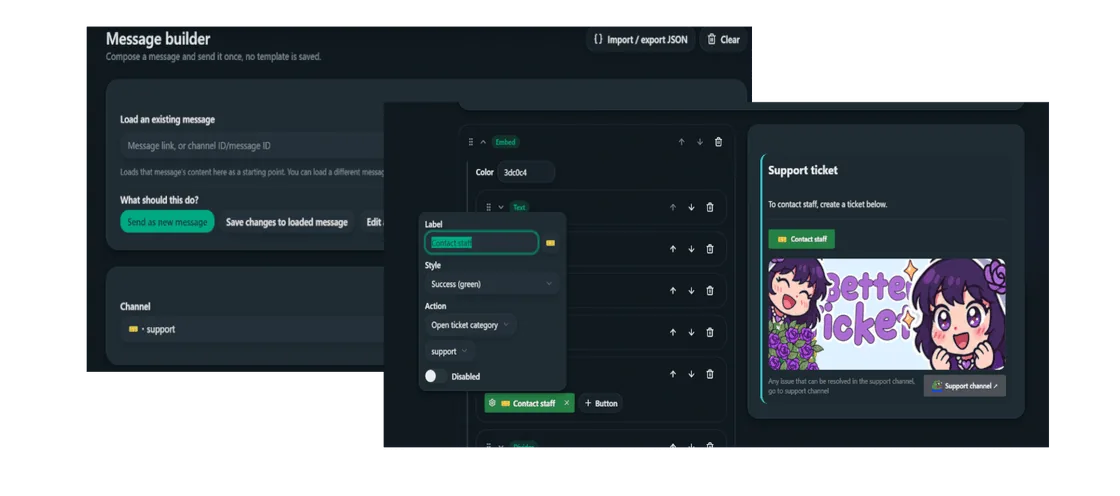
Load and edit an existing message
The Load an existing message field takes a message link (or a channel-id/message-id pair) and pulls its content back into the builder as a starting point. Three options control what happens next:
- Send as new message - composes a fresh message, independent of anything loaded.
- Save changes to loaded message - edits the loaded message in place, only available once one's been loaded, and disabled again once you save with nothing changed.
- Edit a different message - paste another link to edit that one instead.
A message can only be edited back if it was originally sent by this bot, or by a webhook this bot created (via the same Send as webhook option) - not by a different bot or a person. After any successful send or edit, that message becomes the new loaded target automatically, so a follow-up correction is just Save changes to loaded message again, no need to re-paste the link.
Import / export JSON
The Import / export JSON button opens a dialog with the current message as JSON, for copying out (backup, or duplicating a message into another channel or server) and pasting back in. It accepts two shapes:
- This tool's own block JSON - whatever Copy gives you, round-trips exactly.
- A classic Discord message body (
{"content": "...", "embeds": [...]}, the shape most webhook tools and bots export) -contentbecomes a text block, each embed becomes its own colored container block (title, description, fields, image/thumbnail and footer mapped onto text and image blocks as closely as Components V2 allows).
Send a good-looking webhook message
A webhook message reads better than a plain bot message mostly because of two things: a custom name and avatar, and visual structure - a colored container, a divider between sections, a thumbnail or banner image, instead of one wall of text. The Message builder covers both from the dashboard directly, no separate embed generator needed.
A common case is a rules, welcome, or announcement message. Pick the channel, turn on Send as webhook, give it a name like "Rules" with the server's icon as the avatar, then build the message from an Embed block (pick an accent color) holding a Text block per rule, a Divider between sections, and a Section or Image gallery for a banner at the top. The live preview shows exactly what members will see before anything sends.
If you've used Discohook or a similar embed builder, the workflow will feel familiar: build it visually, pick the channel, send, or paste JSON from elsewhere with Import / export JSON. Need a hex code for the accent color? Use the Discord color picker.
Blocks
- Text - one block of content, Discord markdown supported (bold, italic, underline, strikethrough, code, code blocks, spoilers, quotes, headers).
- Divider - vertical spacing between blocks, with a small/large size and an optional visible line.
- Image gallery - 1–10 images, each individually markable as a spoiler.
- Section - one to three lines of text paired with a small thumbnail image or a single button on the side.
- Buttons / menu - up to 5 buttons, or one select menu with up to 25 options. Not both in the same row.
- Embed - a colored container that holds any of the blocks above (except another embed), matching Discord's Components V2 containers.
Buttons and select options
Each button or select option does one of:
- Open a ticket category - same as clicking a ticket panel button.
- Open an application category - same as clicking an apply button.
- Link out - an external URL (
http,https, ordiscord).
Buttons also take a color, an optional emoji (server custom emoji or unicode, searchable picker), and a Disabled toggle to render greyed out and unclickable. A label is only required if the button has no emoji - an emoji alone is a valid button, same as Discord allows natively. A select menu can be disabled the same way. Two options in the same menu can't point at the same category, Discord rejects that as a duplicate.
Deprecated: /ticket send and /application send
Both commands still work, but the Message builder replaces them: it can do everything they did (post a category panel with buttons, pick the channel) plus custom text, images, embeds, select menus, disabled buttons, emoji, and webhook sending. New setups should use the dashboard instead.