Use a webhook when a message should look like it comes from your server, such as rules or announcements with their own name and avatar. Use the bot when the message is clearly the bot talking, like command replies. Both can post the same embeds and layouts, and webhooks created by an app can also carry working buttons. This guide explains the differences and how to build a message that looks intentional either way.
What a webhook changes
Every webhook message can carry its own name and avatar, separate from any bot. A rules post from "Rules" with your server icon reads as part of the server. The same post under a bot's name reads as the bot talking, which is the wrong tone for something meant to feel official.
Webhooks have limits too:
- A webhook posts only into the channel it belongs to.
- It can't read messages or respond to commands.
- A webhook you create yourself in channel settings can't send working interactive buttons. Discord only allows that for webhooks owned by an app.
Webhook vs. bot at a glance
| Webhook | Bot | |
|---|---|---|
| Custom name and avatar per message | Yes | No, always the bot's profile |
| Embeds and Components v2 layouts | Yes | Yes |
| Working buttons and select menus | Only if an app created the webhook | Yes |
| Edit the message later | Through the same webhook | Yes |
| Needs a bot in the server | No | Yes |
Build a message worth sending
Whichever sender you pick, structure matters more than the name at the top. A wall of text looks the same from anyone. What makes rules or announcements look intentional:
- A colored container or embed instead of loose text.
- Dividers between sections, so rule 3 doesn't run into rule 4.
- A banner image at the top.
- Markdown: headers, bold for the key words, and lists.
- Timestamps for events, so each reader sees their own time. The timestamp generator builds them.
For a quick classic embed you'll paste into a webhook tool, use the free Discord embed generator.
Send and edit messages with Better Tickets
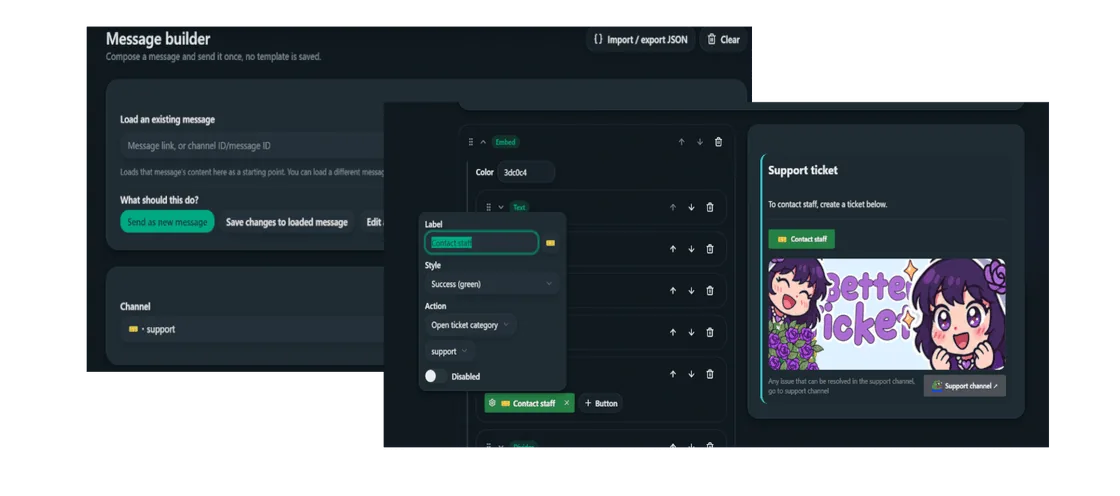
The Better Tickets message builder sends as the bot or as a webhook with its own name and avatar. Because Better Tickets creates the webhook itself, ticket and application panel buttons work on webhook messages too.
Open the message builder
In the dashboard, open Message builder.
Build the content
Add an Embed block with a Text block per section, Dividers between them, and an Image gallery or Section for a banner.
Choose bot or webhook
Turn on Send as webhook and set a name like "Rules" and an avatar, or leave it off to send as the bot.
Check the preview, then send
The live preview matches Discord's layout before anything goes out.
Fix a typo without reposting
Paste the message link into Load an existing message, make the change and choose Save changes to loaded message. This works for messages sent by the bot or by a webhook Better Tickets created, not messages from other bots or people.
Frequently asked questions
What is a Discord webhook?
A webhook is a URL that posts messages into one channel. Each message can use its own name and avatar, so a post can appear to come from "Rules" or "Announcements" instead of from a bot.
Can webhook messages have buttons?
It depends who created the webhook. Discord lets webhooks owned by an app send interactive components such as buttons. Webhooks you create yourself in channel settings can't send working interactive buttons. Better Tickets creates its own webhooks, so its panels work whether you send them as the bot or as a webhook.
Can I edit a webhook message later?
Yes, through the same webhook that sent it. In Better Tickets, paste the message link into the message builder's Load an existing message field, edit it and save changes to update it in place.
Is a webhook or a bot better for announcements?
A webhook usually looks better, because the name and avatar can match the post, such as "Announcements" with your server icon. A bot message is fine for anything that's clearly the bot talking, like command replies.
Do I need a bot to use webhooks?
No. You can create a webhook in a channel's settings and post to it with any tool, including the free Discord embed generator JSON. A bot makes it easier to edit messages later and to add working buttons.
Related tools and guides
- Discord embed generatorBuild an embed and copy webhook-ready JSON.
- Better Tickets message builderSend as the bot or a webhook, with buttons and a live preview.
- Discord color pickerPick the accent color for your announcement.
- Discord timestamp generatorAdd event times that show in each reader's time zone.