Most servers default to whatever posts a message first, usually the bot, and never revisit it. For a one-off command reply that's fine. For a rules message, an announcement, or anything meant to look intentional, the choice between sending as the bot or as a webhook actually matters.
What a webhook changes
A webhook post carries its own name and avatar, independent of the bot's. A rules message posted as "Rules" with the server's icon reads as part of the server's own presentation. The same message posted under the bot's name reads as the bot talking, which is the wrong framing for content that's supposed to feel official.
When to use the bot instead
Anything with buttons that open a ticket or application category has to be interactive, and needs to come from the bot so it can actually respond to clicks. A webhook message can hold buttons visually, but for a panel the send should go through the bot so those buttons function.
Building a message worth sending either way
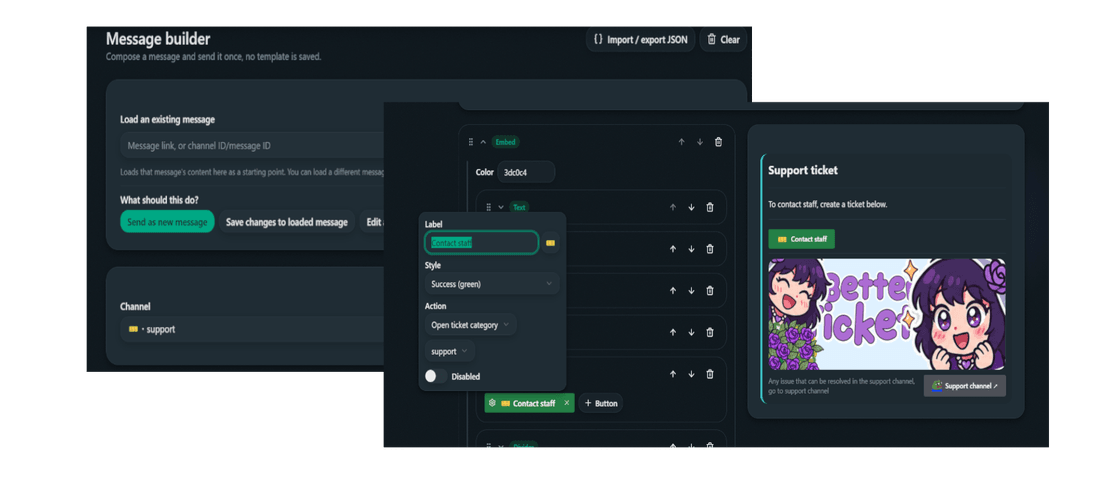
Better tickets let you send the message and attach panel buttons on either bot or webhook messages which are fully functional. Structure matters more than which sender name is attached to it. A wall of plain text reads the same regardless of who "sent" it. What makes a rules or announcement message look intentional:
- An Embed block for a colored container, instead of loose text sitting directly in the channel.
- A Divider between sections, so rule 3 doesn't visually run into rule 4.
- A Section or Image gallery for a banner image at the top.
- Discord markdown inside text blocks, bold and headers, instead of one undifferentiated paragraph.
Open the Message builder
Dashboard → Message builder.
Build the content
An Embed block with a Text block per section, Dividers between them, an Image gallery or Section for a banner.
Choose bot or webhook
Choose whichever suits your interest.
Check the preview, send
The live preview mirrors Discord's real rendering before anything goes out.
Editing after the fact
A webhook-sent message can be loaded back into the builder and edited in place, same as a bot message, as long as it was sent through this bot's own webhook and not a different tool. Paste the message link into Load an existing message and pick Save changes to loaded message, no need to delete and repost over a typo.